Like quite a few people I know, I always read the manuals to anything only when I get stuck. Most times there is recourse, like when building IKEA furniture. If you do manager to mubar it then you can always hammer the thing together.
Sometimes though there isn't a recourse like when the Android Marketplace makes the transition from paid app to free app permanent. Put another way, once an app is introduced to the market place as free, it remains free forever.
This is the state as of June 10th 2010. I cant see any rationale behind such a limitation. I am sure it (I would hope) its stated in the Android Marketplace guidelines, but its so counter-intuitive that I didn't give a thought to flipping the switch from paid to free for a single day promotion. It turns out that my promotion has become permanent now :).
Showing posts with label android. Show all posts
Showing posts with label android. Show all posts
Friday, June 11, 2010


Sunday, April 4, 2010
Whats red and green and goes 50 mph ?
Well you wont see that joke in our latest Android application: "Kids Riddles", instead you'll find a selection of riddles with beautiful color illustrations.
This is the first book type app from the publishing lineup of Okenko books. For more details checkout the post at okenkobooks.
"Kids Riddles" as usual available from the Android marketplace now.
This is the first book type app from the publishing lineup of Okenko books. For more details checkout the post at okenkobooks.
"Kids Riddles" as usual available from the Android marketplace now.
Saturday, March 20, 2010
Almost a jigsaw puzzle: Mosaic puzzles
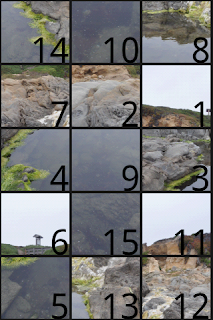
My latest app: shuffle around tiles to make a chosen picture. Choose from easy (2x2) grid to medium (3x5) grid to insane (many x many) grid.
Any puzzle you start is automatically saved on exiting the application and restarted at the same state.
The application leverages the accelerometer to shuffle the tile board (if available).
Update: v2.0 now available on the marketplace. Create a puzzle from any image or take one with your phone camera. Menu item "New puzzle" will bring up the image selection gallery.
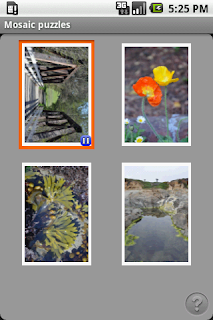
Main page with one paused puzzle.
If you are stuck, press the menu and use the Help button.
There will be a lot more coming, including a new platform, watch this space!. As usual available on the Android marketplace now.
Any puzzle you start is automatically saved on exiting the application and restarted at the same state.
The application leverages the accelerometer to shuffle the tile board (if available).
Update: v2.0 now available on the marketplace. Create a puzzle from any image or take one with your phone camera. Menu item "New puzzle" will bring up the image selection gallery.
Main page with one paused puzzle.

If you are stuck, press the menu and use the Help button.

There will be a lot more coming, including a new platform, watch this space!. As usual available on the Android marketplace now.
Friday, February 26, 2010
Pexeso na ruby
My first foray into an app for kids, a game of course what else ? :).
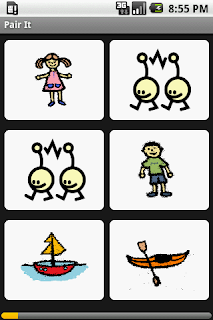
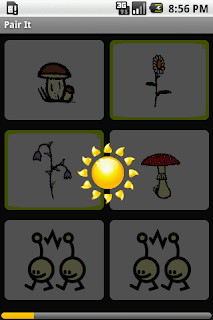
Pair It is an app that shows sets of pictures which kids have to put together, essentially create associations. The association is the same for each screen of pictures. Each screen contains 3 pairs of pictures.
Jitka of okenko books designed the game and drew the illustrations. This is the first of a number of upcoming apps for kids, that I am looking forward to working with her on.
As usual available on the Android marketplace now.
Pair It is an app that shows sets of pictures which kids have to put together, essentially create associations. The association is the same for each screen of pictures. Each screen contains 3 pairs of pictures.


Jitka of okenko books designed the game and drew the illustrations. This is the first of a number of upcoming apps for kids, that I am looking forward to working with her on.
As usual available on the Android marketplace now.
Thursday, February 25, 2010
Android development environment update from SDK 1.5
I'm finally getting to releasing apps that have been sitting around. Then I thought it may be a good time to update my development environment. As of 30 min ago I used Android 1.5 on Eclipse 3.4. SDK v2.0.1 is now available.
Installing Android 1.5 was a originally a simple exercise. Everything went as outlined in the readme/howto documentation. That is a pleasant surprise for a development environment believe me. I typically find one or two things that require some additional tweaking, perhaps because of a hard coded path (Perl's install dirs without spaces come to mind, though thats also been a while), but 1.5 was a breeze.
Initial experience with the new SDK install scheme, with SDK Setup, wasn't as smooth. To be precise everything was smooth but the very start. Right off the bat I got the following error
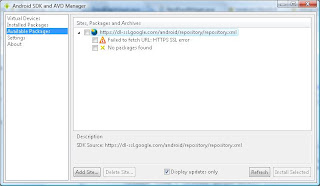 That reads "URL: HTTPS SSL error occured trying to access the location https://dl-ssl.google.com/android/repository/repository.xml".
The SDK docs mention flipping a setting in that same dialog to force HTTP. That didn't work for me even after restarting the application. I then found this solution: modify the androidtool.cfg. I know I didn't have a proxy problem and tbh I was a bit lazy to create the directory and modify the config file.
I then noticed the UI application is a java app spun off by a batch file. On the off chance that the environment doing a double-click didn't correspond to what a batch file would expect, I opened up a cmdline, cd to the tools folder and executed the batch file from there. After this the "force http" setting worked fine.
As I said that was a but a minor glitch and the rest was smooth sailing. I am up and running now with android 1.1, 1.5 and 1.6.
PS: I still suspect the original error with the HTTPS is due to the fact that the relevant cert wasnt/isnt in my keystore.
Installing Android 1.5 was a originally a simple exercise. Everything went as outlined in the readme/howto documentation. That is a pleasant surprise for a development environment believe me. I typically find one or two things that require some additional tweaking, perhaps because of a hard coded path (Perl's install dirs without spaces come to mind, though thats also been a while), but 1.5 was a breeze.
Initial experience with the new SDK install scheme, with SDK Setup, wasn't as smooth. To be precise everything was smooth but the very start. Right off the bat I got the following error
 That reads "URL: HTTPS SSL error occured trying to access the location https://dl-ssl.google.com/android/repository/repository.xml".
The SDK docs mention flipping a setting in that same dialog to force HTTP. That didn't work for me even after restarting the application. I then found this solution: modify the androidtool.cfg. I know I didn't have a proxy problem and tbh I was a bit lazy to create the directory and modify the config file.
I then noticed the UI application is a java app spun off by a batch file. On the off chance that the environment doing a double-click didn't correspond to what a batch file would expect, I opened up a cmdline, cd to the tools folder and executed the batch file from there. After this the "force http" setting worked fine.
As I said that was a but a minor glitch and the rest was smooth sailing. I am up and running now with android 1.1, 1.5 and 1.6.
PS: I still suspect the original error with the HTTPS is due to the fact that the relevant cert wasnt/isnt in my keystore.
Sunday, October 11, 2009
nCaltrain - the Caltrain schedule on the go
 nCaltrain is an application for Android phones that presents the current Caltrain schedule so you can easily tell when the next couple of trains leave or the full daily schedule for day.
Update version 2.0 now available: clicking on any of the trains in either Commute or Schedule mode pops up a dialog with the complete route of the specific train (all stations and departure times).
nCaltrain has 2 display modes: Commute and Schedule mode. The most important information from the Commute mode is also available as a widget.
Commute mode

You can search for trains between any two stations on the Caltrain route. Your search can be filtered by the type of train (bullet, limited or local). The correct timetable for the date is automatically retrieved from the date in your phone.
Widget view
 You can add this widget to your home screen so you have an instant view of the next train departure. The next train is determined by the filter setup in the Commute mode.
Schedule mode
 complete schedule between any two stations. This view shows all trains and you can filter by day: weekday, Saturday or Sunday.
Available now from the Android Marketplace.
Thursday, August 6, 2009
Newborn - helping you give baby milk
Congratulations on becoming a new mum or dad. Those first couple of months are a lot of fun, much like a roller coaster ride.
It'd be much easier if babies could communicate but are instead resigned to noises of disapproval or approval. This can make you nervous and the more factors you can eliminate quickly the better for you and baby. Keeping track of feeding times is a chore. Knowing how long its been since your baby's last milk helps to know if hunger is the cause of baby's discomfort.
Knowing when baby's next milk is due can help especially breast-feeding mums to plan their next hours much better.
To help with this I wrote an application for Android mobile phones (T-Mobile G1, T-Mobile Touch, HTC Hero and others). This application is named "Newborn" and makes keeping track of feeding times a breeze. Simplicity and ease of use were the main factors in building this application as such it consists of a single screen with all the information you need and one settings page.
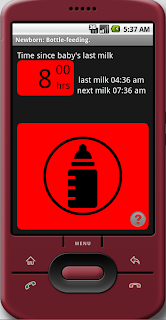 This screen shows all the important details you need.
This example is for bottle-feeding mode.
Here you see that it has been 8hrs (8hrs is the maximum amount period) since baby last got milk. The last milk was at 4:36am and the next one is scheduled for 7:36am.
The settings page is accessible from the Menu button.
A comprehensive help is available on this screen (press the question mark button).
Newborn settings page
You can choose between breast-feeding or bottle-feeding modes. This defaults to breast-feeding.
You can also choose the time between feeding. This defaults to 3hrs as typically recommended for newborn babies.
The settings will only be saved if you press the Save button. Canceling the screen by pressing Back or Home will discard any changes you made.
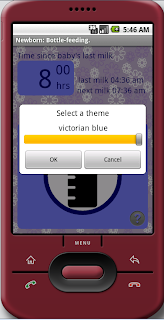
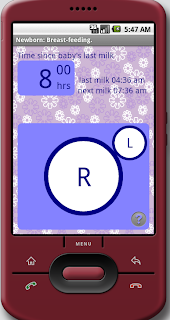
Hint: Setting different themes for the main screen: this main screen can be customized by performing a "long-click" (click and hold) anywhere on this screen. This displays a theme selection dialog, where you can choose from several themes. Confirming your selection above which shows you a preview of the theme sets the theme for Newborn as shown below.
It'd be much easier if babies could communicate but are instead resigned to noises of disapproval or approval. This can make you nervous and the more factors you can eliminate quickly the better for you and baby. Keeping track of feeding times is a chore. Knowing how long its been since your baby's last milk helps to know if hunger is the cause of baby's discomfort.
Knowing when baby's next milk is due can help especially breast-feeding mums to plan their next hours much better.
To help with this I wrote an application for Android mobile phones (T-Mobile G1, T-Mobile Touch, HTC Hero and others). This application is named "Newborn" and makes keeping track of feeding times a breeze. Simplicity and ease of use were the main factors in building this application as such it consists of a single screen with all the information you need and one settings page.
Newborn main screen
 This screen shows all the important details you need.
This example is for bottle-feeding mode.
Here you see that it has been 8hrs (8hrs is the maximum amount period) since baby last got milk. The last milk was at 4:36am and the next one is scheduled for 7:36am.
The settings page is accessible from the Menu button.
A comprehensive help is available on this screen (press the question mark button).
Newborn settings page

You can choose between breast-feeding or bottle-feeding modes. This defaults to breast-feeding.
You can also choose the time between feeding. This defaults to 3hrs as typically recommended for newborn babies.
The settings will only be saved if you press the Save button. Canceling the screen by pressing Back or Home will discard any changes you made.
Hint: Setting different themes for the main screen: this main screen can be customized by performing a "long-click" (click and hold) anywhere on this screen. This displays a theme selection dialog, where you can choose from several themes. Confirming your selection above which shows you a preview of the theme sets the theme for Newborn as shown below.


I hope you find this application useful, it was fun writing it.
Subscribe to:
Posts (Atom)